





By now you must have known about EPFO’s WhatsApp service. Facility from checking PF balance to downloading passbook without logging into the website. You just have to save EPFO’s official WhatsApp number +91 8796441800 in your mobile and message Hi. That’s it…service started. The step by step method is described in detail below.
With this facility, it has now become easier than before for employed people to get information about their Provident Fund (PF) account. Now PF balance can be checked from home through the WhatsApp service of Employees Provident Fund Organization (EPFO). Not only this, along with downloading the passbook of their account, employees can also get information about the last five transactions. For this, there is neither need to go to EPFO office nor to login to the portal every time.
As soon as you start chatting on EPFO’s official WhatsApp number +91 8796441800, you see many options, from which you can get the information you need. Let us understand its complete method.
These 3 important facilities will be available on WhatsApp
Currently three types of information can be obtained through EPFO’s WhatsApp service.
- PF Balance: You can check the balance of PF account linked to your different member IDs. In this, information about employee and employer’s share, pension contribution and the date of last deposit of money is available.
- Last 5 Transactions: You can see the last five transactions done in the account. These may include transactions related to monthly contributions, interest deposits and PF withdrawals.
- Passbook Download: You can download the passbook of your PF account in PDF format. In this, information about employee and employer’s contribution, pension contribution and interest accumulation is available.
First of all registration and OTP verification on WhatsApp
To use this service, your WhatsApp number should be the same which is registered with your UAN i.e. Universal Account Number. EPFO confirms your identity by sending OTP to this number.
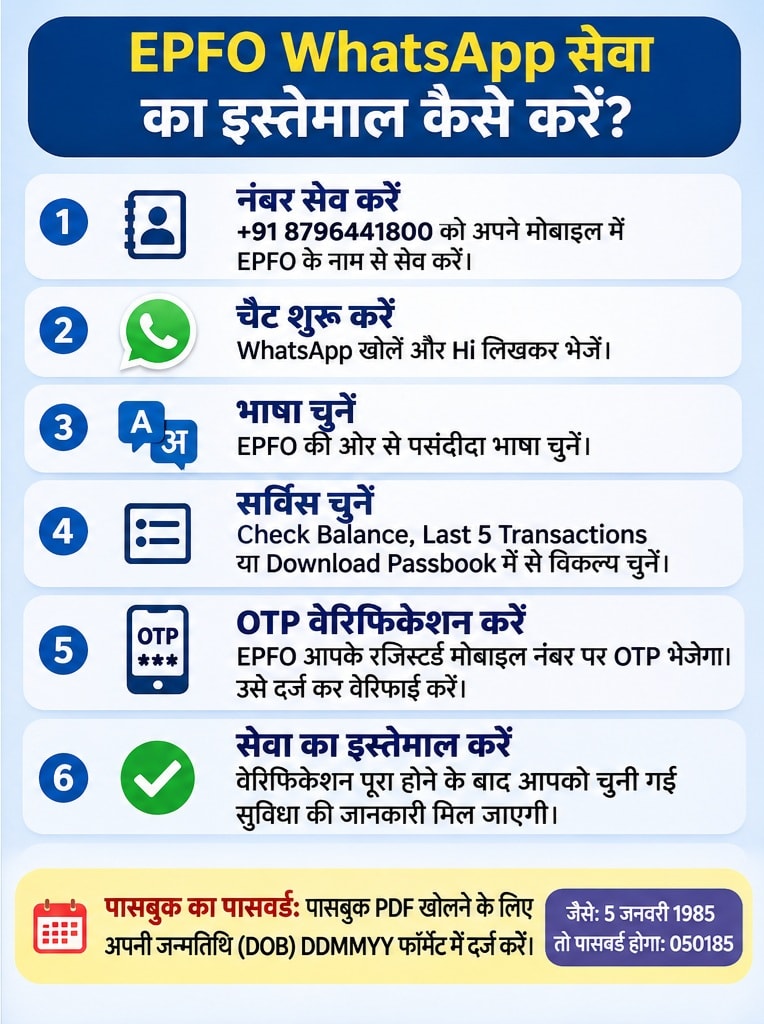
- Save EPFO number: Save the number +91 8796441800 in your mobile in the name of EPFO.
- Open WhatsApp: Start a chat on a saved number and send Hi.
- Select language: A message will come from EPFO to select the preferred language. Select your language and send.
- Select the service option: After this, four options will be available on the screen – Check Balance, Last 5 Transactions, Download Passbook and Change Language.
- Do OTP verification: On choosing a service as per your need, the option of OTP verification will appear. OTP will be sent to the mobile number linked to your EPFO account.
- Enter OTP: Select Enter OTP option in WhatsApp chat and enter the OTP received on mobile. If OTP is not received, you can choose the option of Resend OTP.
- Complete the verification: You will get a confirmation message if the OTP is correct. After this you will be able to use the related service.
How to check PF balance on WhatsApp?
After completion of OTP verification, follow this procedure to check PF balance.
- Open EPFO’s WhatsApp chat.
- Select Check Balance option in the main menu.
- If there is more than one Member ID, select the relevant account.
- After this EPFO will show you the balance of that account.
- In this, the total PF balance along with employee’s share, employer’s share, pension contribution and the date of last deposit of money will be visible.
- Keep in mind that only the option given in the chat has to be selected. This service will not start just by sending ‘Check Balance’ in the message.
How to download EPF Passbook from WhatsApp?
- If you want to see the information about employee and employer’s contribution along with interest deposited in your PF account, you can download the passbook.
- Go to EPFO’s WhatsApp chat.
- Select Download Passbook option from the menu.
- If there is more than one Member ID, select the related account.
- EPFO will send you the PDF file of the passbook.
- After downloading the PDF, enter the password to open it.
This password will be your date of birth (DOB), which will have to be entered in DDMMYY format. For example, if date of birth is 5 January 1985, the password will be 050185.
Details of employee and employer’s contribution, pension contribution and interest deposited in the account will be available in the passbook. If multiple Member IDs are linked to your UAN, then the passbook of each account will have to be downloaded separately.
How to view last 5 PF transactions?
You can also use WhatsApp facility to know how much money has been recently deposited in your PF account or when it was withdrawn.
- Open the main menu in EPFO chat.
- Select Last 5 Transactions option.
- If there is more than one Member ID, select the related account.
- After this, the date and information of the last five transactions of the account will appear on the screen.
This may include transactions like monthly contribution deposited by the employer, interest credit and PF withdrawal.
These things have to be kept in mind
While using this facility of EPFO, remember some important things. First of all, use only the official number +91 8796441800. Your WhatsApp number should be the same which is linked to the EPF account and UAN. Do not share OTP with any other person. Proceed only by selecting the options visible in the chat. Sometimes it may take a few minutes to get the information.
Source: ndtv.in